Appearance
Organizing Photos into Albums
The Albums page lets you create and manage collections of photos and videos, making it easier to organize memories by event, trip, or theme.
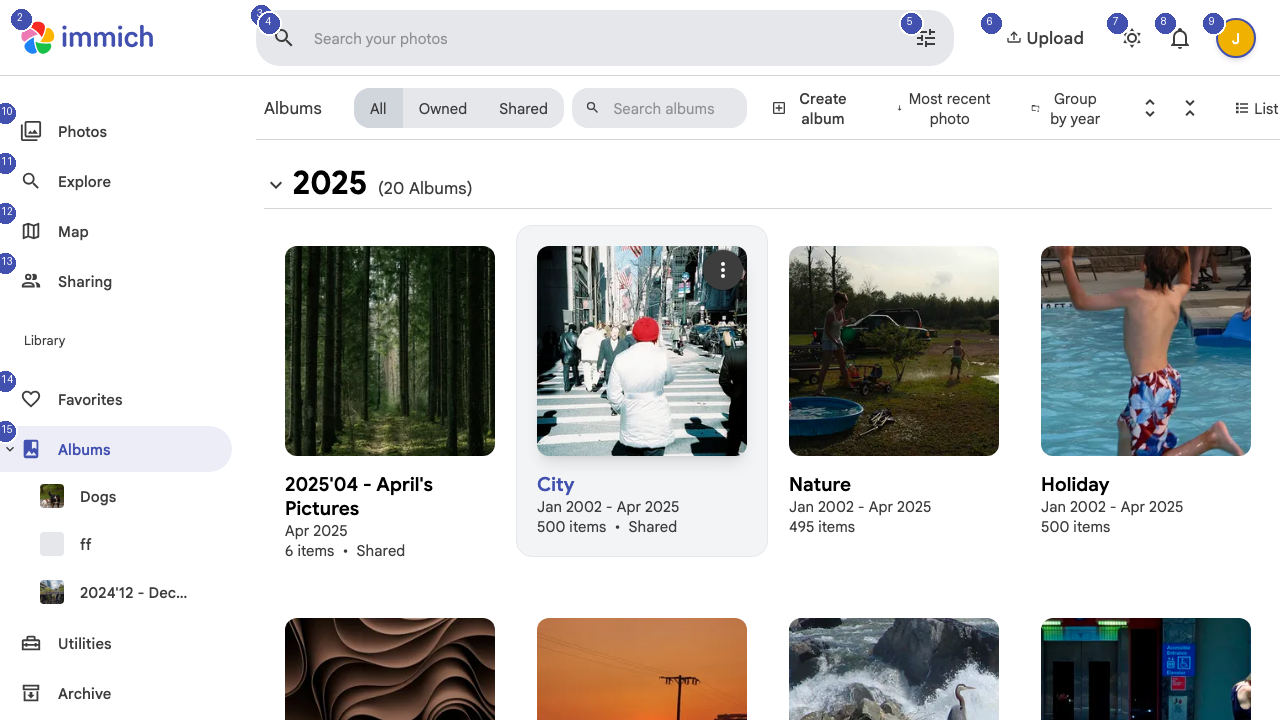
Viewing Your Albums
Albums are displayed as a grid of cards, each showing a cover image, the album title, and metadata like the date range and number of items. The page header shows the total album count (for example, "2025 — 65 Albums").
You can filter albums using the tabs at the top:
- All — Every album in your library
- Owned — Albums you created
- Shared — Albums shared with you or that you shared with others
Creating a New Album
Click the Create button near the top of the page to start a new album. Give it a name and optionally add a description. You can then add photos by browsing your timeline or dragging and dropping files directly into the album.
Sorting Albums
Use the sort controls to arrange your albums by:
- Most recent — Albums with the newest photos appear first
- Group by year — Albums organized by the year they were created
Album Details
Click any album card to open it and view all its contents. Inside an album, you can:
- Add or remove photos
- Edit the album title and description
- Share the album with other Immich users
- Set a different cover photo
- Download all photos as a ZIP file