Appearance
Browsing Your Photo Timeline
The Photos page is the central hub of Immich, displaying all your uploaded photos and videos organized chronologically.
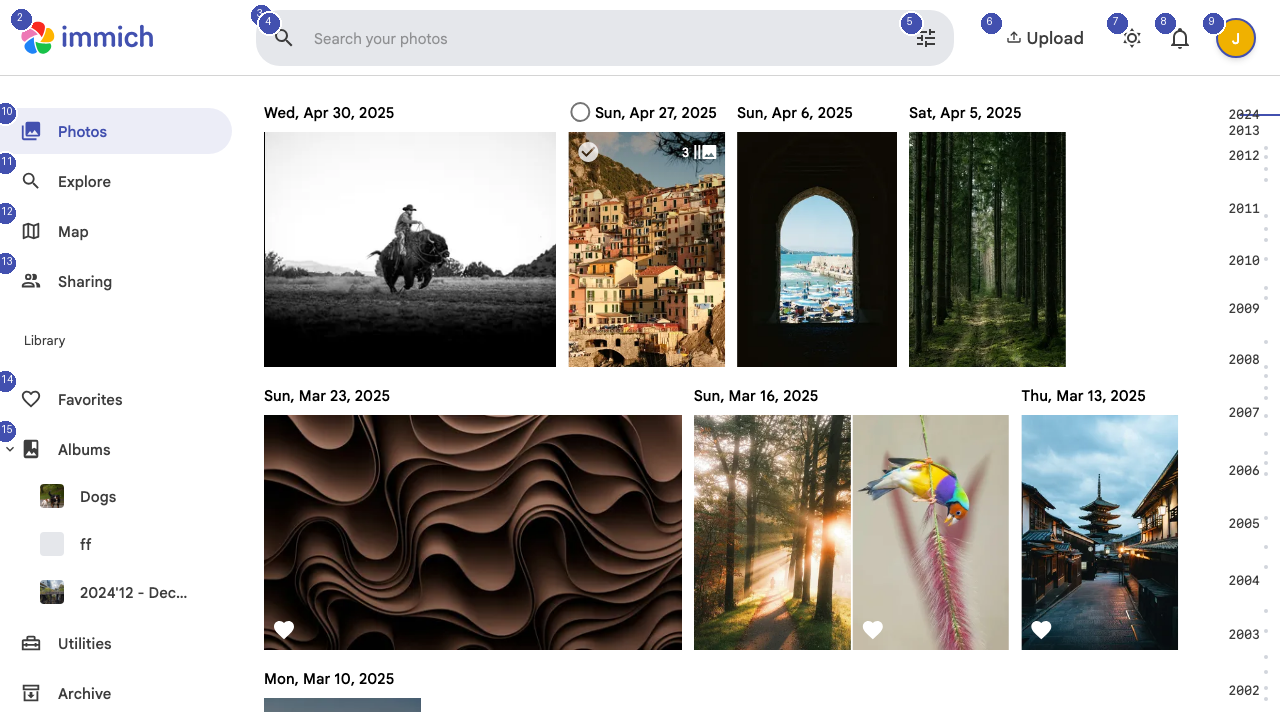
Timeline View
Your photos appear in a scrollable timeline, grouped by date. Each section header shows the date (for example, "Wed, Apr 30, 2025") with thumbnails arranged in a responsive grid below it. Scroll down to move back through time, or scroll up to see your most recent uploads.
Uploading New Photos
To add new photos to your library, click the Upload button [4] in the top-right corner of the page. You can select individual files or entire folders from your device. Immich processes uploads in the background, generating thumbnails and extracting metadata automatically.
Navigation Sidebar
The left sidebar provides quick access to all major sections of Immich:
- Photos [7] — Your full photo timeline (current view)
- Explore [8] — Browse by people, places, and categories
- Map [9] — View photos plotted on a world map
- Sharing [10] — Manage shared albums and partner access
- Favorites [11] — Photos you have marked as favorites
- Albums [13] — Your custom photo albums
Below the main navigation, you will find your pinned albums for quick access.
Search
Use the search bar [3] at the top of the page to find specific photos. Immich supports searching by date, location, file name, and AI-powered image content recognition. Click Show search options [5] to access advanced filters.
Theme Toggle
Switch between light and dark modes using the theme toggle button [6] in the top navigation bar.